Up next in 10

How to Make an LED Blinker Circuit (Po-Po- Lights)
Dec 1, 2025


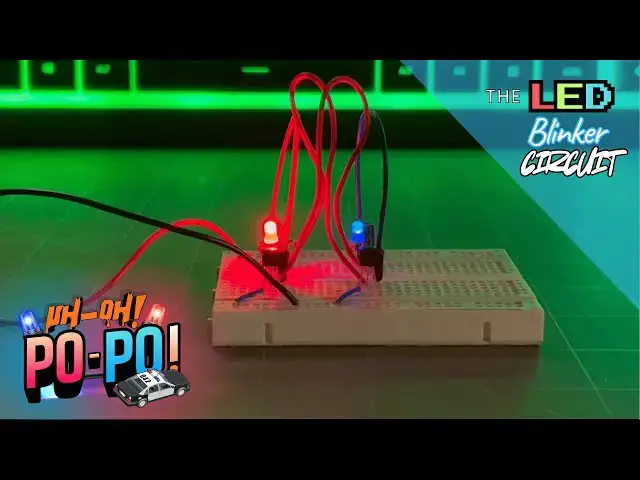
This is a companion video for our Circuit Component Super Series at Motbots.com. In this video we make The LED Blinker Circuit that was a circuit example in Part 3 of our series titled, "How Components Work Together in Real Circuits."
It's encouraged that you go check out our Circuit Component Super Series, particularly "How Components Work Together in Real Circuits," to gain a better understanding of how the components used for this circuit work together to blink LEDs. (Link below)
Video for Our Website Page: "How Components Work Together in Real Circuits: Having Components Join Forces"
Page URL: https://motbots.com/how-components-work-together-in-real-circuits-having-components-join-forces/
Description: This is a supplemental video for a post made on our website.
Website: https://motbots.com
_________ PROJECT INFO _________
🛠️ Parts List
https://motbots.com/how-components-work-together-in-real-circuits-having-components-join-forces/#Parts_List_for_the_LED_Blinker_Circuit
🗺️ Schematic for The LED Blinker Circuit
https://motbots.com/how-components-work-together-in-real-circuits-having-components-join-forces/#The_Schem-ATIC
_________ RESOURCES _________
⚡️ Circuit Component Super Series
Show More Show Less View Video Transcript
0:00
Welcome to Mbots. I'm Dustin and this is
0:03
the LED blinker circuit.
0:17
Welcome to this video on the LED blinker
0:20
circuit. This circuit is part of our
0:23
circuit component super series on the
0:26
website. This video is to show the
0:29
assembly of that LED blinker circuit.
0:33
I'm not going to go too much into how
0:36
this circuit works. Some of that was
0:39
gone over on the website on that third
0:44
part of this 12-part series titled How
0:48
Components Work Together in Real
0:50
Circuits: Having Components Join Forces.
0:53
I'll leave the link to everything I'm
0:56
talking about here down in the
0:58
description of this video and I might
1:00
also uh place some imagery in the video
1:04
as well. So again, all I wanted to do
1:07
for this video was to just show the
1:10
assembly of the LED blinker circuit and
1:13
let's jump into that right now. So, as
1:15
you can see here, I have in front of me
1:16
the components and items that we'll need
1:19
to assemble this LED blinker circuit. I
1:23
have here a basic 9V battery with a
1:28
battery snap connector attached to it
1:30
ready to go with its uh negative and
1:33
positive uh lead wires. I have a
1:38
breadboard here. I have two 10
1:41
microfarad polarized capacitors or
1:44
electrolytic capacitors. I have a couple
1:47
of jumper wires here, one red one and
1:49
one orange one. I have another couple of
1:54
longer red jumper wires here. These are
1:58
more of your typical solid core uh
2:02
jumper wires. I'll have to bend these
2:04
later to get them to uh bend the way I
2:08
need them to or bend them in submission.
2:10
I have another couple of smaller blue
2:13
jumper wires here. Also, the typical
2:16
solid core wire. I also have a couple of
2:19
resistors here. These are two 47,000
2:24
ohm resistors or 47 kohm resistors. And
2:27
I have two other uh resistors here that
2:30
are both the value of 470 ohms. Right
2:34
here I have two
2:36
uh NPN transistors. These happen to be
2:40
PN2222A
2:42
transistors. And I have my red and blue
2:46
LEDs here. And these are the LEDs that
2:50
we're going to try to get to uh blink
2:53
for us for this LED blinker circuit. So,
2:56
if you were to look at the blog post for
3:00
this particular circuit in our circuit
3:02
component super series, that's the post
3:05
how components work together in real
3:07
circuits or part three of the series. It
3:10
starts off with connecting the 9volt
3:12
battery to the breadboard, but I'm not
3:14
going to do that. I'm going to go ahead
3:15
and put the components onto the board
3:18
itself. And then the last thing I'll do
3:21
is connect the 9volt battery to the
3:24
breadboard. So, the first thing that I'm
3:26
going to do is go ahead and put the two
3:32
transistors,
3:33
the two NPN transistors onto the
3:37
breadboard. And I have the transistor
3:42
face or the flat face of the transistor
3:47
pointing directly towards me. And the
3:50
legs of this particular NPN transistor
3:55
going from left to right is emitter,
4:00
base and collector. So the emitter is on
4:04
the left, the base is in the middle and
4:07
the collector is the right lead with the
4:10
flat face facing towards me. So again,
4:14
I'm going to place both of these
4:15
transistors flat face facing towards me.
4:18
And I'm going to put the three legs of
4:22
this transistor
4:24
on column B or excuse me, column C in
4:29
the rows four, five, and six. So I have
4:34
the emitter in column C, row four. I
4:40
have the base lead at column C row five
4:45
and I have the collector lead on column
4:49
C row six.
4:54
And if I pick up my circuit here
4:59
and show you a little closer,
5:01
that's the flat face of this transistor.
5:04
You can see it's a PN222A.
5:08
I have its emitter leg on column C, row
5:12
four, the base at column C, row five,
5:16
and the collector at column C, row six.
5:23
So next, I'll put the second transistor
5:26
again having the flat face facing
5:29
towards me. And I'm going to place the
5:31
legs for this transistor on column C and
5:35
at rows 14, 15, and 16. Next, what I
5:39
want to do is I want to connect the
5:43
emitters for both of the transistors to
5:47
ground. And I'm going to have this rail
5:52
here, this blue rail with the negative
5:55
sign be my negative or common ground
5:59
rail. And I'm going to have this red
6:03
power rail here with the plus sign be my
6:07
positive power supply or the positive
6:11
side of my power supply for this rail
6:13
here. So, I'm going to reserve those two
6:16
as my positive and negative rails. So,
6:18
I'm going to take one of my shorter blue
6:21
jumper wires and place one jumper wire
6:25
at column B into row four that's in line
6:31
with the leg of
6:37
this transistor's emitter leg going to
6:41
ground. So, just so you know, looking at
6:44
the schematic that is provided on the
6:46
website, this is my Q1 and Q2
6:50
transistors.
6:53
And I'll take this other blue jumper
6:58
wire. And just as I did for the first
7:02
transistor, I'm going to place one side
7:04
of the jumper wire in line with the
7:08
emitter pin of or the emitter lead of
7:12
the second transistor and the other end
7:14
of that jumper wire to ground. So now I
7:17
have both of the emitters for each of
7:19
these transistors going directly to
7:22
ground. Next, I'm going to take one of
7:24
my 10 microfarad capacitors.
7:28
Making sure that I have it in proper
7:33
orientation.
7:34
This gray line here is
7:39
referencing the negative lead of this
7:43
capacitor, this polarized capacitor.
7:46
That would be the cathode. So that gray
7:50
line here means that this lead here is
7:54
the negative and the other one is the
7:57
positive. Okay. So I'm going to place it
8:01
in row H. Sorry, I'm going to place it
8:06
in column H at rows five and six. And
8:09
I'm going to take the second 10
8:13
microfarad capacitor and I'm going to
8:16
place its leads into column H rows 15
8:22
and 16. So just so you know, I have the
8:26
cathode of this capacitor representing
8:30
C1 from the schematic. It's negative
8:34
lead going in to column H, row six. and
8:39
capacitor
8:41
C2 here as referenced from the schematic
8:44
from the website. I'll also provide that
8:46
schematic down in the description below.
8:49
This capacitor C2, its negative lead is
8:53
in column H, row 16.
8:58
And I'll give a closeup view of what
9:02
that looks like so far.
9:05
So, this is how the circuit setup is as
9:09
of right now.
9:13
So,
9:15
we'll continue on from there. Next, what
9:17
I'm going to do is I'm going to go ahead
9:18
and place
9:21
the red LED onto the breadboard.
9:24
And I'm going to take the longer lead of
9:29
the LED. This longer lead here is going
9:32
to be the anode or the positive lead of
9:38
this LED. And I'm going to place it near
9:42
the first capacitor, capacitor C1, as
9:46
referenced from the schematic. And I'm
9:47
going to place that anode into column G
9:51
row 4. And then I'm going to place the
9:53
cathode of the LED on column G row 5.
9:57
And that cathode of the red LED will be
10:00
in line with
10:03
that positive lead of the capacitor. And
10:07
now I'm going to take one of the 470 ohm
10:11
resistors
10:13
and I'm going to place one of its leads
10:16
in line with the anode of the red LED
10:20
and the other end of the resistor
10:23
into my positive power rail here. And
10:27
now I'm going to take the blue LED and
10:29
I'm going to do the same thing as I did
10:31
with the red LED. I'm going to place its
10:34
longer lead or the positive lead of the
10:39
blue LED into column G row 14. And the
10:44
negative lead or cathode of the blue LED
10:46
is going to be at the point column G row
10:50
15 which is in line with the positive
10:54
leg or lead of this second capacitor or
10:57
C2 if you're referencing the schematic.
11:00
Again, I'm going to take one of these
11:02
470 ohm resistors. I'm going to place
11:04
one end of it in line with the anode of
11:08
the blue LED and the other end of the
11:11
resistor. Its leg is going to go into
11:14
the positive power rail of the
11:17
breadboard. So now in order to complete
11:20
the timing side of the circuit, I have
11:24
my timing capacitors. Now I'm going to
11:26
take my timing resistors, which is just
11:29
a couple of 47 km resistors or 47,000
11:35
ohm resistors. I'm going to take one of
11:37
those 47 K ohm resistors and I'm going
11:40
to take one lead or one end of that
11:43
resistor and place it in line with the
11:46
negative or cathode lead of capacitor C1
11:53
as referenced on the schematic. So, I
11:56
have one lead of that 47 km resistor on
12:02
column I, row six. And I'm going to take
12:06
this other 47 km resistor, and place one
12:10
end of it in line with this second
12:14
capacitor, its cathode lead or negative
12:17
lead at column I,
12:21
row 16. And the other end of that
12:24
resistor is going to go into the
12:26
positive rail for our power supply. So
12:30
if I pick up
12:32
and show you a little closer,
12:36
this is how the circuit looks so far
12:41
and where everything is going.
12:46
So you can get a good look at it.
12:50
So now I'm going to continue and we're
12:52
almost done here. I'm just going to
12:56
first connect the negative of each the
13:01
negative lead of each capacitor to the
13:04
base of its opposing transistor.
13:07
I'm going to do that first because it's
13:09
just going to be easier that way for me.
13:11
So, what I mean is I'm going to if I'm
13:14
looking at the first capacitor or
13:16
capacitor C1, if you're looking or
13:20
referencing the schematic,
13:23
I'm going to put one end of my jumper
13:25
wire in line with the negative terminal
13:29
of that capacitor and I'm going to place
13:31
the other end of this jumper wire at the
13:33
base of this opposite side transistor.
13:38
So, if you're referencing the provided
13:41
schematic,
13:42
I'm going from the negative leg or lead
13:47
or the cathode lead of capacitor C1
13:52
to the base of transistor Q2 as
13:58
referenced in the provided schematic for
14:01
the LED blinker circuit. I'm going to
14:03
take another
14:06
red jumper wire here and I'm going to do
14:08
to capacitor
14:10
two or C2 as referenced on the schematic
14:14
the same as I did for capacitor C1. I'm
14:17
going to take this jumper wire and place
14:20
it in line with that capacitor C2 as
14:24
referenced in the schematic. I'm going
14:26
to place it in line with its cathode
14:29
lead. I'm going to take the other end of
14:31
this jumper wire and place it in line
14:34
with the base of
14:39
this transistor,
14:42
transistor Q1, as referenced on the
14:45
provided schematic for this LED blinker
14:48
circuit. So, if I show you a closeup
14:52
here,
14:54
we can see
14:56
that I've taken one of these long red
15:00
jumper wires. They're kind of too long,
15:03
but that's what I have. I place one end
15:05
of that jumper wire in line with the
15:08
cathode of this capacitor. This is
15:10
capacitor C1 as referenced on the
15:12
provided schematic. That is at column F,
15:16
row six here. The other end of this same
15:21
jumper wire goes in line with the base
15:26
of this transistor, transistor Q2 as
15:29
referenced on the schematic diagram at
15:32
column D, row 15.
15:35
And this other second jumper wire, one
15:38
end is placed at column F, row 16 in
15:41
line with the cathode of capacitor C2
15:45
here. And the other end is placed at the
15:48
point column D, row 5 in line with the
15:52
base of transistor Q1 as referenced from
15:56
the schematic diagram provided.
16:03
Now I just need to make the connections
16:05
from the collectors to the capacitors.
16:09
Therefore closing the path that we need
16:12
for our timing part of the circuit. I'm
16:17
going to take one end of this orange
16:18
jumper wire and place it in line with
16:21
the positive lead of this capacitor C1.
16:25
I have it at the point column J row
16:29
five. And I'm going to take the other
16:31
end of it and place it in line with the
16:34
collector
16:36
of transistor Q1
16:40
that is at point column E, row six on my
16:44
breadboard. And I'm going to take this
16:47
blue jumper wire here. And similarly,
16:50
I'm going to place one end of this
16:52
jumper wire in line with the anode of
16:55
capacitor C2 here. It's this capacitor
16:58
here with its positive lead or its
17:02
anode. And I'm going to place the other
17:03
end of this jumper wire in line with the
17:06
collector of transistor Q2 as referenced
17:11
on the schematic. And I've placed it at
17:14
the point column E row 16 on my
17:18
breadboard here. So, before I hook up
17:21
the battery to my circuit and test this
17:24
out, I'm just going to show you a closer
17:26
look here as to how this circuit looks.
17:30
It looks awful right now, but I'm using
17:34
what I have to be able to accomplish
17:36
what it is that we want to do, and
17:38
that's to create this simple LED blinker
17:42
circuit.
17:50
So the next thing that we need to do is
17:53
just hook up the power
17:55
to
17:57
our circuit here. So to do that, I'm
18:00
going to take the positive
18:03
lead of my 9volt battery and place it
18:08
into my positive power rail here. And
18:10
then I'm going to place the negative
18:14
lead of my 9volt battery somewhere, it
18:18
doesn't matter, on my negative rail. And
18:22
you can see
18:23
the circuit lights up. And we have a LED
18:27
blinker circuit.
18:29
So, if you're curious about creating
18:31
this circuit yourself and need more on
18:34
the instructional
18:36
content and how the circuit works, I
18:39
encourage you to check out on how
18:41
components work together in real
18:43
circuits where you can find more about
18:46
this particular LED blinker circuit and
18:48
more on components. So, I highly suggest
18:51
that you go check out that circuit
18:52
component super series where you can
18:54
learn more about circuits and
18:56
components. It's a 12-part super series.
18:59
This is for part three of that series
19:02
and we'll eventually work our way to
19:05
creating a robot and doing much more in
19:07
that series. So, I highly suggest you go
19:09
check that out. I appreciate you
19:12
spending your time with me here. I hope
19:14
that you were able to create this
19:15
circuit. It's a lot of fun and it's
19:17
really neat. And if you ask me, I think
19:19
it looks like police car lights. So,
19:22
this was a really neat and fun circuit.
19:24
I hope you try it. Again, thanks for
19:27
joining us here at Mbots. Until next
19:30
time, keep at it and stay motivated.
#Electronic Components